How to Write Your First Song in 30 Minutes—Even Without an Instrument or Sheet Music
No instrument or sheet-music skills needed. Build a melody, chords and a full song in your browser, turn humming into notation, and export it. Free, no sign-up.
This article was submitted by a member. Views and content are the author’s own and do not represent this site.
Want to write your first song? You do not need an instrument or sheet music: in about 30 minutes you can build a melody, add chords, and save a complete song in your browser.
By TTLB Tools | Last updated: November 24, 2026 (tool screens and limits checked) | Reading time: about 10 minutes | Hands-on time: about 30 minutes
TTLB Tools music tools: free, no installation, no sign-up—write a song right in your browser
TL;DR: You can make a simple, playable song in about 30 minutes: build a four-bar melody, add a familiar chord progression, arrange a verse and chorus, add a basic beat, and export it. It is free, needs no account and no installation, and works in your browser. If a tune is stuck in your head, you can also hum it for 10 seconds and turn the recording into an editable sheet-music draft. The whole workflow is free; Premium only adds long-audio analysis, batch processing, advanced notation export and cloud storage.
What you will learn
- How a catchy short pop song is put together.
- How to write a memorable melody without reading staff notation.
- How to choose a key, a tempo, and one chord progression.
- How to arrange a melody into a complete song.
- How to use a generator when you are stuck for ideas.
- How to turn humming into an editable sheet-music draft.
- Which file formats to use for saving, sharing, and continuing your work.
About this guide: Written by the TTLB Tools team. Every screen, limit and price in this guide was checked on the live tools on November 24, 2026, and we update it when prices or limits change.
▶ Type a few numbers and hear your first melody (free, 30 seconds) Open it in another tab and follow along.
A Melody Shows Up. Then It Disappears.
A melody can arrive anywhere: while you walk, get ready for bed, or do the dishes. For a moment you can hear it clearly—and then it is gone before you can write it down. Or maybe you have wanted to write a song for years, but instruments, music theory, sheet music, and professional recording software have made the first step feel too big.
You do not need to start like a professional songwriter. Write a short melody, add a simple chord progression, arrange a couple of sections, and make something you can play from beginning to end. That already counts as writing a song.
In this guide we use TTLB Tools, a set of free browser-based music tools, to build a short original demo called “Tonight’s Sea.” The melody was newly written for this guide; it is an original teaching example, not an arrangement of an existing track. You can open it in the tool, listen to it, take it apart, and use it as a starting point for your own experiments.
| Tonight’s Sea (demo song) | Details |
|---|---|
| Key / meter / tempo | C major · 4/4 · 108 BPM |
| Length / structure | 36 bars · about 80 seconds · Chorus → Verse → Chorus → Bridge → Chorus |
| Chorus chords | C – G – Am – F (I–V–vi–IV) |
| Verse chords | Am – F – C – G (vi–IV–I–V) |
| Arrangement | Piano melody · guitar chords · bass · drums |
| How to open it | My Works → “Load the demo song”, or Write with Numbers → “Start from an example”. No download needed. |
▶ Listen to the 80-second demo (MP3, instrumental) Plays right in your browser.
1. Hear the Song: What Makes a Short Pop Song Catchy?
Chapter 1 of 8 · about 2 min — in this chapter: You will hear a complete example and learn five ingredients you can reuse in your own songs.
Before writing anything, listen to a finished example. “Tonight’s Sea” is a short pop-style demo with a chorus-first structure. Hearing it first gives you a concrete reference for the melody, chords, arrangement, and overall length you will build yourself.
Five Ingredients of a Catchy Short Pop Song
- A strong opening: the chorus or most memorable phrase arrives early, so listeners do not have to wait for the hook.
- A repeating chord loop: four familiar chords give the song a clear harmonic foundation.
- A compact melody: a small range plus a little repetition makes a phrase easy to remember.
- A clear pulse: a steady tempo and a simple kick-and-snare pattern keep the song grounded.
- A focused arrangement: a short form still feels complete when each section has its own energy.
✦ 2-minute practice: load and listen
- Open My Works and press “Load the demo song.” Five sections appear.
- Play the whole song once, then play only the chorus again.
- Open Write with Numbers and choose “Tonight’s Sea (demo chorus)” under “Start from an example.” The chorus melody shows up as numbers 1–7 and as notation.
- Notice which phrase you can hum after listening.
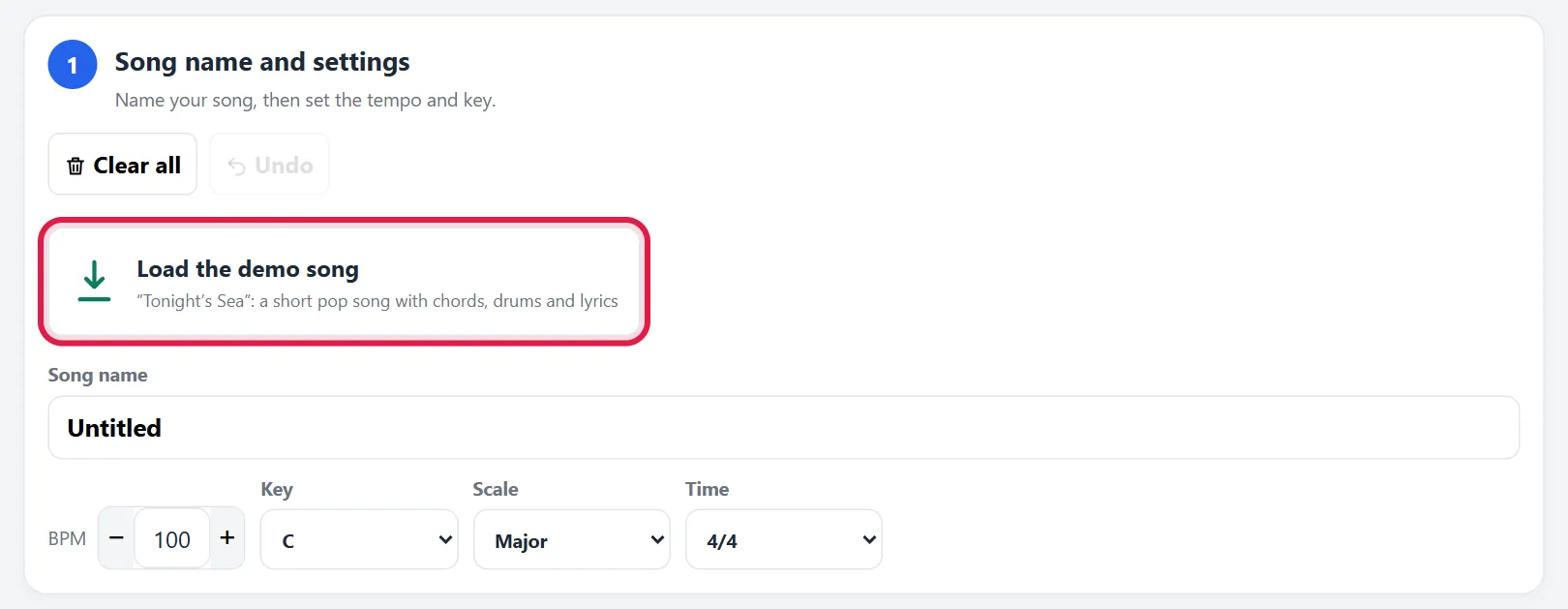
Figure 1: In My Works, one click loads the whole demo song (five sections). The red box shows where to click.
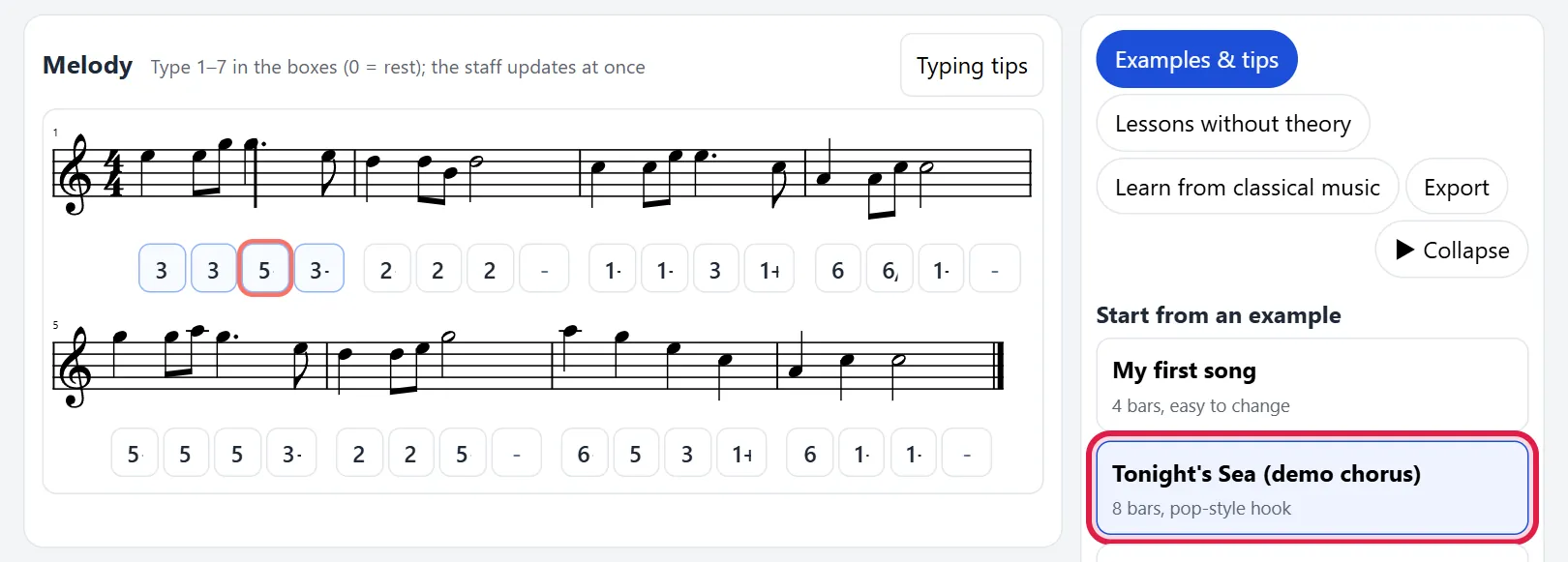
Figure 2: The demo chorus in Write with Numbers. Staff notation on top, number input (1–7) below. Red box: the example you choose.
The goal is not to copy the demo note for note. Notice how repetition, chords, and arrangement work together, then use those ideas to build something of your own.
Takeaway: A short pop song is catchy because the hook comes early, four chords repeat, the melody stays small, the beat is steady and each section has its own energy.
2. Create Your First Melody: Repeat, Then Add a Twist
Chapter 2 of 8 · about 5 min — in this chapter: You will write a four-bar melody that is easy to remember.
A melody is shaped by three simple choices: pitch (how high or low a note is), rhythm (when it happens), and duration (how long it lasts). You do not need a complicated phrase; a short idea that is easy to remember is the best place to begin.
In Easy mode you type the numbers 1–7 into the boxes (1 = do, 2 = re, 3 = mi, and so on; 0 is a rest). The staff updates instantly, so you can see the notes even if you cannot read music yet. The key you choose at the top decides which actual notes the numbers stand for.
A Beginner-Friendly Four-Bar Method
Key idea: Write two bars, repeat them, and change only the last note of bar four.
- Write a two-bar phrase using a small set of notes.
- Repeat it once so the listener has a pattern to recognize.
- Change just one note at the end of the fourth bar.
- Play it back. If something feels awkward, change one note or one length at a time.
Three Small Changes That Make a Difference
- Change one pitch: move the final note up or down to give the phrase a different feeling.
- Change the rhythm: keep the same notes but lengthen or shorten one of them.
- Leave space: a rest lets a melody breathe. You do not have to fill every beat.
✦ 5-minute practice: your first four bars
- Open Write with Numbers in Easy mode and set the length to 4 bars.
- Type a two-bar phrase with the numbers 1–7.
- Repeat it, then change one note in the last bar.
- Press Play. Save the phrase—you will use it in the next chapters.
Stuck? Play the demo chorus and copy the feeling of a phrase you like, not its notes. The “Start from an example” list also has a four-bar “My first song.”
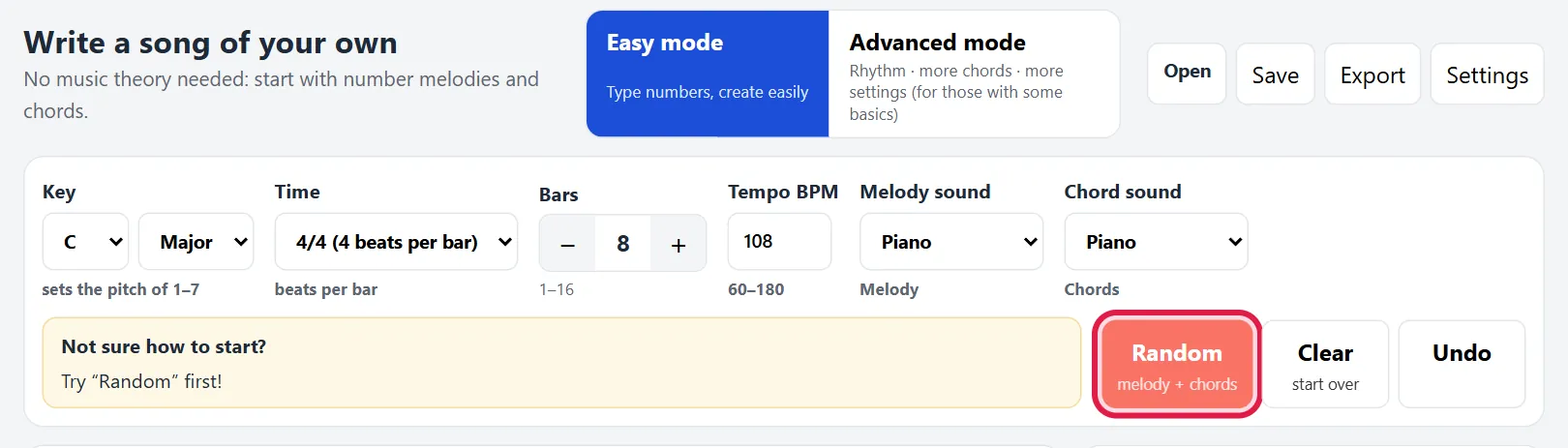
Figure 3: Easy mode. Choose a key, meter, number of bars, tempo and instruments—or press “Random” (red box) to get a starting point.
Takeaway: To make a melody memorable, repeat a two-bar idea and change only one note at the end.
3. Music Theory Made Simple: Keys, Tempo, and Chords
Chapter 3 of 8 · about 5 min — in this chapter: You will choose a key, tempo and chord progression by listening, not memorizing.
Theory is useful when it helps you make a choice. For a first song you only need four ideas:
| Idea | What to remember |
|---|---|
| Major / minor | Major often sounds brighter and more open; minor can feel more reflective. Try both and trust your ears. |
| Tempo (BPM) | Beats per minute. About 70 feels slow, 100–110 is a comfortable pop range, 120+ adds energy. These are starting points, not rules. |
| Time signature | Start with 4/4. Count “1-2-3-4” and put a kick and a snare on it. |
| Chord progression | Start with I–V–vi–IV. In C major that is C–G–Am–F, one chord per bar. |
One Chord Progression to Remember
Key idea: I–V–vi–IV (in C major: C–G–Am–F) is all you need for your first chorus.
The melody is the face of a song; chords are its background. One chord per bar, repeated, already sounds like pop. For a calmer verse, reorder the same four chords as vi–IV–I–V (Am–F–C–G)—that is exactly what the demo song does. The way the chords are played matters too: block chords sound fuller, while arpeggios (one note at a time) feel lighter.
✦ 5-minute practice: change the mood
- Play your melody in a major key, then in a minor key.
- Raise the tempo by about 20 BPM and listen again.
- In the chord area, press “1-5-6-4” under “Common progressions” (that is I–V–vi–IV) and play it. Then try 6-4-1-5 (Am–F–C–G) and compare.
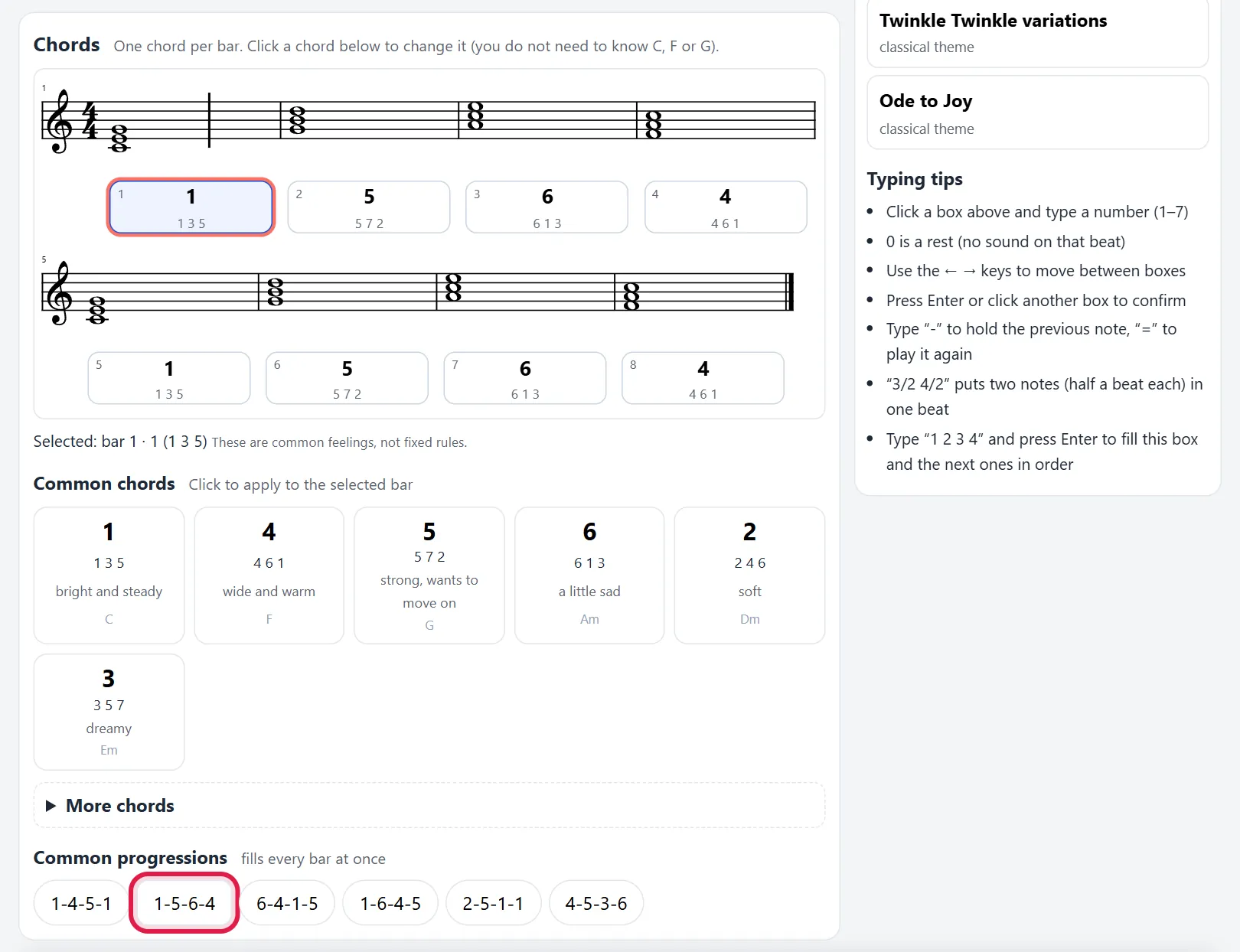
Figure 4: The chord area. Pick a chord for each bar, or fill every bar at once with a common progression such as 1-5-6-4 (red box).
Takeaway: For a first song you only need a tempo around 100–110 BPM, 4/4 time and the I–V–vi–IV progression.
4. Turn Your Melody Into a Complete Song
Chapter 4 of 8 · about 10 min — in this chapter: You will arrange short ideas into a verse, a chorus and a bridge that play from start to finish.
A melody can sound promising and still feel unfinished. Song structure gives it a journey. Start with a verse and a chorus, then add other sections only if they help.
| Section | What it does |
|---|---|
| Intro | Introduces the mood or musical idea. |
| Verse | Moves the story forward and keeps the energy controlled. |
| Chorus | Carries the main hook and the most memorable idea. |
| Bridge | Adds contrast before returning to a familiar section. |
| Outro | Brings the song to a close. |
Key idea: A first song needs only a melody, chords and a simple beat. For short videos, start with the chorus.
A traditional layout is Intro → Verse → Chorus → Verse → Chorus → Bridge → Chorus. For a short-form pop idea you can put the chorus first, which is what “Tonight’s Sea” does: Chorus → Verse → Chorus → Bridge → Chorus, about 80 seconds in total.
Give Each Instrument a Job
- Drums provide the pulse and make sections feel different—lighter in the verse, fuller in the chorus.
- Bass supports the harmony and gives the track a low-end foundation.
- Piano or guitar carries the chords and sets the mood.
- The melody stays the focal point. Do not add layers just because you can.
How to Build the Whole Song in the Tool
The Melody, Chords, Rhythm, Lyrics and My Works pages all share one song, so you can build it section by section. (Write with Numbers is a separate, one-section project: export it as JSON and use “Open JSON” in My Works to bring it in.) My Works is where you reorder sections, change their length and play the whole song.
✦ 10-minute practice: arrange your song
- Open My Works, name your song and set the tempo.
- Press “Add section” to create a Verse and a Chorus. Put the Chorus first if you like.
- Fill each section on the Melody, Chords and Rhythm pages. Keep the verse drums light and the chorus fuller.
- Back in My Works, press Play and listen from beginning to end. Fix any awkward joins.
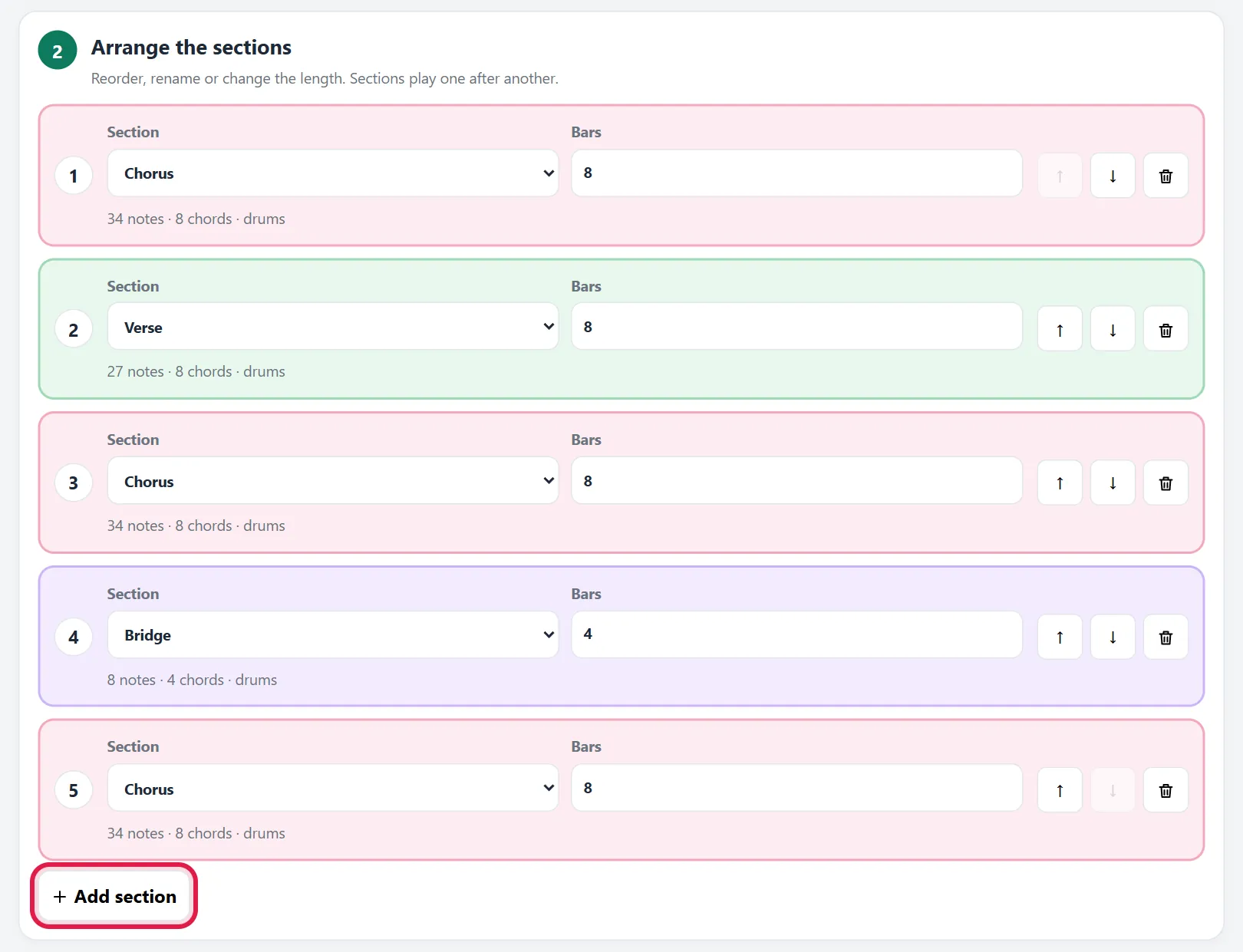
Figure 5: My Works. Reorder sections, change their length and play the whole song. Red box: Add section.
Takeaway: A first song is complete when a melody, chords and a simple beat play from a clear beginning to a clear end.
5. Stuck for Ideas? Use a Generator as a Starting Point
Chapter 5 of 8 · about 3 min — in this chapter: You will use a style and the generator to get past the blank page, then make the result your own.
If you wrote your own melody in chapters 2–4, feel free to skip this chapter and go to chapter 6. Come back only when you get stuck.
A blank page can be harder than editing an imperfect idea. The melody and chord generator gives you something to react to. Treat the result as a sketch—not a finished song and not a replacement for your choices. It is not AI: it follows fixed musical rules, so you can understand and change everything it produces.
Choose a Style, Then Make It Yours
- Pop: a familiar place to start when you want a clear hook.
- Rock: more drive and energy.
- Ballad: slower and more reflective.
- Lo-fi: relaxed, soft or background-friendly.
Key idea: After you generate an idea, change at least two notes or one chord, then play it again.
What about lyrics?
Start with one sentence you actually want to say—a feeling, a memory, a small moment. Put it in the verse or chorus first and refine the syllables and rhyme later. The Lyrics page lets you write words section by section. The demo’s lyrics are available in the Chinese and Japanese versions of the tool; in English you can write your own on the same page.
✦ 3-minute practice: turn a generated idea into yours
- Open the melody and chord generator and pick a style.
- Generate a short idea (melody, chords and rhythm).
- Change two notes and one chord, then adjust the tempo.
- Play it, and save the result as a starting sketch.
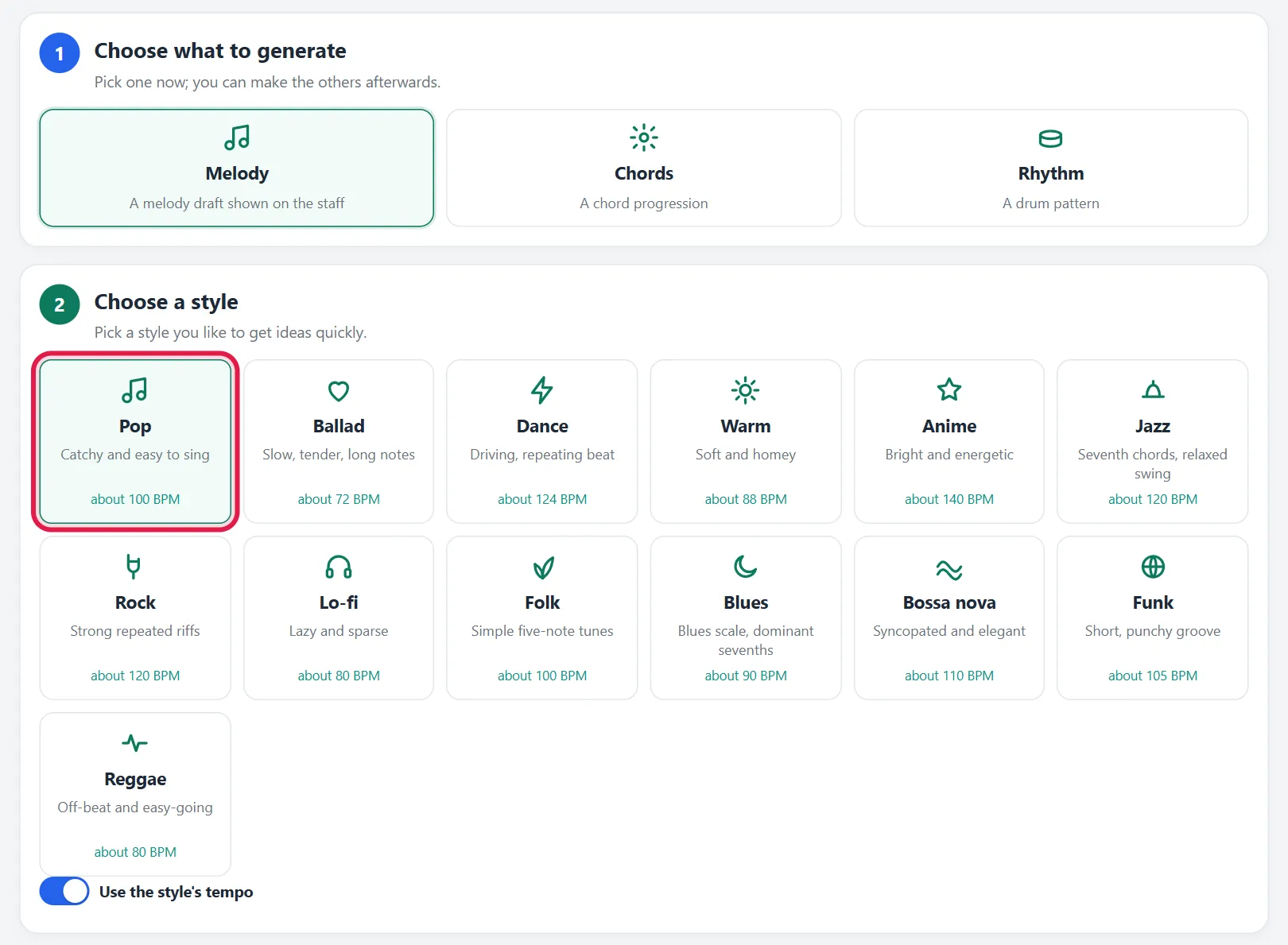
Figure 6: The generator. Choose what to generate, then a style such as Pop (red box), Ballad, Lo-fi or Rock.
Takeaway: A generator gives you a sketch, not a finished song: change two notes and one chord to make it yours.
6. Turn Your Humming Into Sheet Music
Chapter 6 of 8 · about 2 min — in this chapter: You will record a 10-second hum and turn it into an editable notation draft.
▶ Hum the tune you have in your head right now—10 seconds is enough Free, no sign-up
Sometimes you can hear a melody clearly but cannot tell which notes you are singing. Hearing and writing down are different skills. The easiest fix is to record first: even a ten-second voice memo preserves the shape of an idea. A ten-second memo beats a perfect idea that is already forgotten.
What Audio to Score Tries to Do
- Pitch detection: estimates which notes you are singing or playing.
- Rhythm analysis: estimates when notes begin and how long they last.
- Tempo and harmony: gives rough clues about speed and chords.
Treat the Result as an Editable Draft
This is a rough draft, not a transcription—and it is not AI. A single hummed line recorded in a quiet room is much easier to analyze than a noisy recording or a full mix with several instruments. Some pitches or note lengths will need correcting. The goal is to capture a useful starting point, not to promise a flawless score in one click.
Check and Correct the Draft
- Play the notation and compare it with the melody you hummed.
- Move any note that sounds too high or too low.
- Adjust note lengths where the rhythm feels off.
- Play it again and make small corrections until it matches your idea.
Privacy: Recordings and audio files are processed in your browser and are never uploaded or saved.
✦ 2-minute practice: hum it, then fix it
- In a quiet place, record about 10 seconds of a melody you just thought of.
- Open Audio to Score, press “Record with microphone” (or upload a file) and let it analyze.
- Correct one or two notes and press Play. Is it your tune again?
Longer than 30 seconds? Free: up to 30 seconds per attempt—plenty for capturing an idea. Got a band-practice recording, or a phone full of hummed voice memos? Premium analyzes up to 10 minutes per file, processes many files in a batch (one ZIP download), and exports TAB and MusicXML. Chapter 8 shows when it is worth it.
▶ See what Premium adds for long recordings and batches Free tools first, Premium only if you hit a limit.
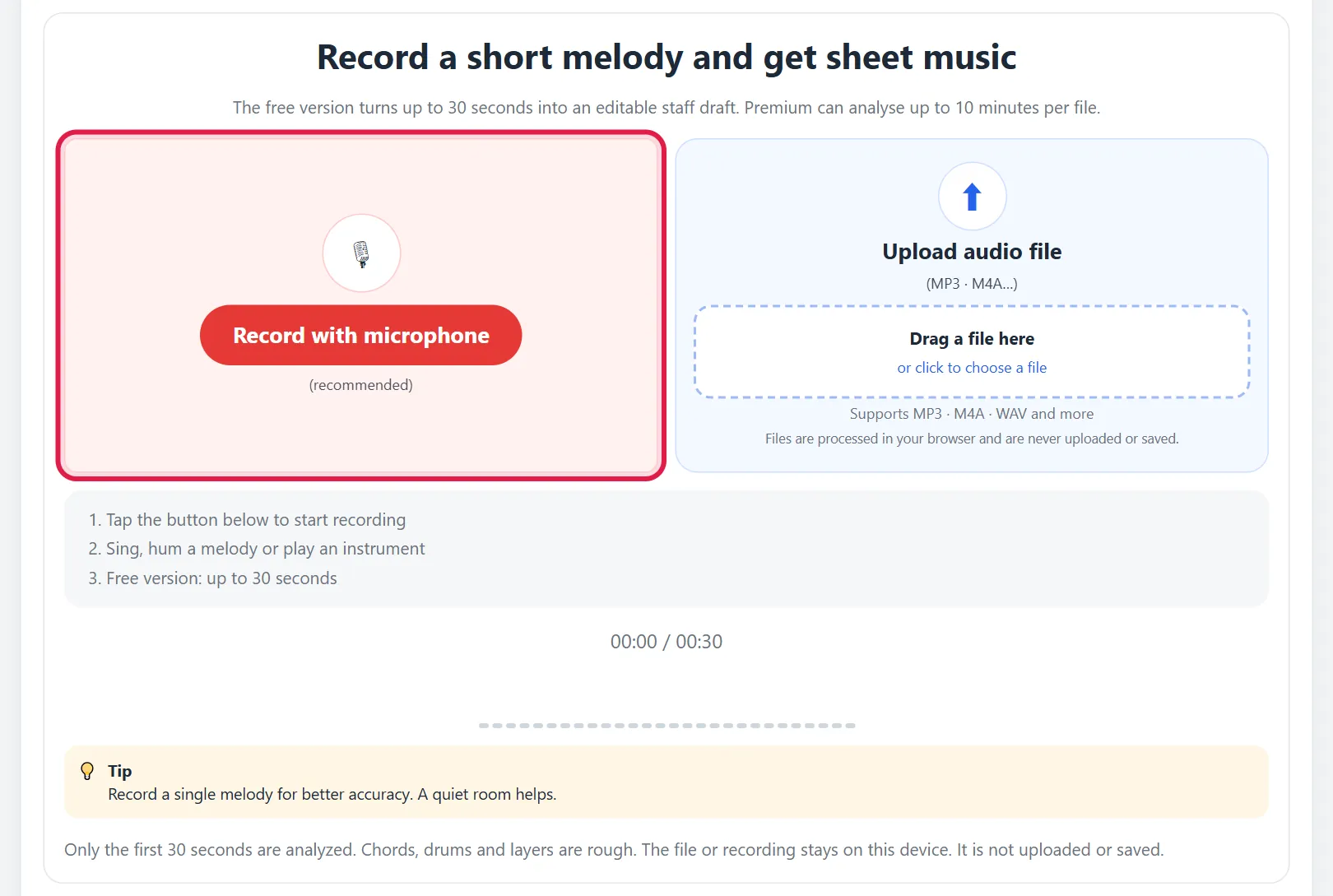
Figure 7: Audio to Score. Record with the microphone or upload a file; the free version analyzes up to 30 seconds. Red box: Record with microphone.
Takeaway: Audio to Score turns a hummed melody into an editable draft; the free version analyzes up to 30 seconds, and every result needs a quick correction pass.
7. Save, Export, and Share Your Music
Chapter 7 of 8 · about 2 min — in this chapter: You will know which file format to pick, so your song never gets lost.
Once your song plays, save it in the formats that match what you want to do next. One file does not have to do everything: keep an editable project backup, an audio version for listening, and a score if you want to read or print it.
| Your goal | Format | Why it helps |
|---|---|---|
| Listen or send the song to a friend | WAV | Audio you can play on almost any device. Free up to 3 minutes; Premium up to 10. |
| View or print the notation | PDF / PNG | A convenient visual copy of the score. |
| Continue in other music software | MIDI | Stores notes and timing; the sound depends on the software that plays it. |
| Keep an editable backup | JSON | Reopen and continue your project in TTLB Tools (“Backup (JSON)”). |
| Share notation with other musicians | MusicXML / LilyPond / TAB / GP5 | Premium formats. Check that the receiving software supports them. |
A good habit: save a clearly named JSON backup, export a WAV to listen to, and keep a PDF or PNG when you need the score. Use the song title and date in the file names instead of leaving everything as “Untitled 1.”
✦ 2-minute practice: save your first song
- Export a JSON backup.
- Export a WAV and play it outside the editor.
- Export a PDF or PNG and check that the notation is readable.
- Rename the files with the song title and date.
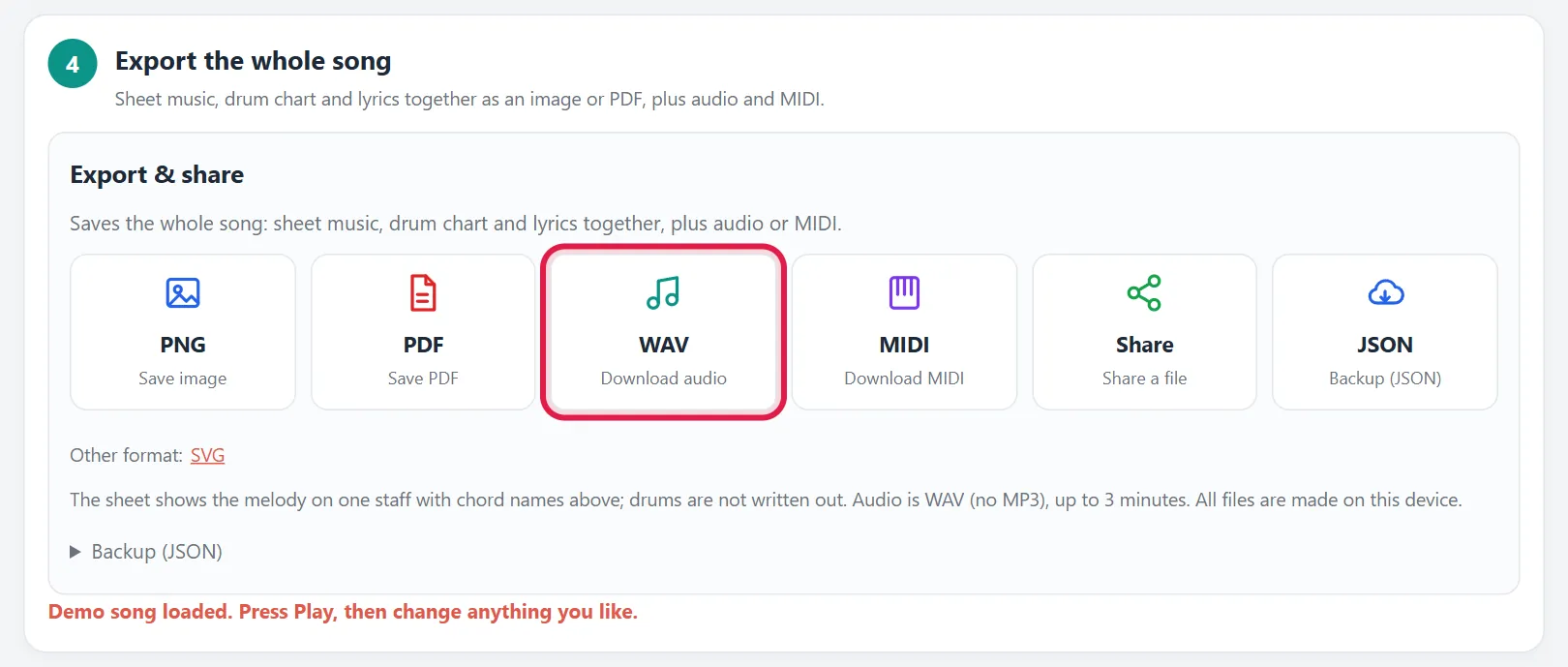
Figure 8: Export & share. Save as PNG, PDF, WAV (red box), MIDI or JSON.
Takeaway: Keep three files for every song: a JSON backup to edit, a WAV to listen to and a PDF or PNG to read.
▶ Play your exported song for a friend—then write song number two (free) Your next song takes about 10 minutes.
8. Finish Your First Song in 6 Steps—and Know When Premium Helps
Chapter 8 of 8 — in this chapter: You will finish a complete first song and know when a paid plan is worth it.
Your First Song: A 6-Step Checklist
- Create a four-bar melody. Type the numbers 1–7; repeat two bars and change the last note.
- Add a chord progression. I–V–vi–IV, then listen to check it fits.
- Arrange a Verse and a Chorus. Or start with the Chorus for a short-form feel.
- Add a simple drum pattern. Kick, snare and hi-hat; lighter verse, fuller chorus.
- Play the whole song. Fix any awkward transitions.
- Save the project as JSON and export a WAV. Add a PDF if you want the score.
A short, simple song is still a finished creative project. Completing one gives you a foundation for the next.
▶ Listen to the demo, then start your own first song (free, no sign-up) No installation needed.
What Can You Do for Free?
The free tools are enough to create melodies, chords, rhythms and lyrics, and to export PNG, PDF, WAV (up to 3 minutes), MIDI and JSON. Audio to Score analyzes up to 30 seconds per attempt. You do not need an account, a login or an installation for the basic workflow. Ads are displayed in the free version.
When Does Premium Make Sense?
Premium helps when you hit a real limit, not before. Typical moments:
- You want to turn a band-practice recording into a draft: analyze up to 10 minutes per file, within a monthly allowance of 500 minutes (free: 30 seconds). It also detects the key and splits long takes into 8-bar sections.
- Your phone is full of hummed voice memos: analyze several files in a batch and download the results as a ZIP.
- You are handing the music to a guitarist or other musicians: export TAB, Guitar Pro (GP5), MusicXML and LilyPond, and import MIDI or MusicXML.
- You switch between devices: keep up to 50 songs in the cloud and open them anywhere. Ads are also removed across the site.
| Feature | Free | Premium |
|---|---|---|
| Melody / chords / rhythm / lyrics | Yes | Yes |
| PNG / PDF / MIDI / JSON | Yes | Yes |
| WAV export | Up to 3 minutes | Up to 10 minutes |
| Audio to Score | Up to 30 seconds per attempt | Up to 10 minutes per file |
| Monthly analysis allowance | — | 500 minutes |
| Batch analysis / ZIP download / key detection | — | Yes |
| MusicXML / LilyPond / TAB / GP5 | — | Yes |
| MIDI / MusicXML import | — | Yes |
| Cloud storage | — | Up to 50 songs |
| Ads | Displayed | Removed site-wide |
Pricing and Payment
Premium is prepaid for a fixed period and never renews automatically. Buy again before it ends and the new time is added after your current end date, so no days are wasted. When the period ends you simply return to the free version, and any songs you saved in the cloud are kept. Paid fees are non-refundable, so try the free tools first.
Prices last checked: November 24, 2026.
| Plan | Price | Per month |
|---|---|---|
| 1 month (try it) | US$5 (NT$165) | US$5.00 |
| 3 months | US$13.50 (NT$450) | US$4.50 · save 9% |
| 6 months (popular) | US$24 (NT$840) | US$4.00 · save 15% |
| 12 months (best value, for regular use) | US$36 (NT$1,188) | US$3.00 · save 40% |
The 12-month plan works out to US$3.00 a month—about 10 cents a day. Prepaid, no automatic renewal, and your saved songs stay if you stop. Prices are shown in US dollars (the site also lists NT$ amounts); payment is available through PayPal, with international cards accepted, and takes effect immediately.
Not sure? Start with one month. If you stop, you simply return to the free version—there is nothing to cancel.
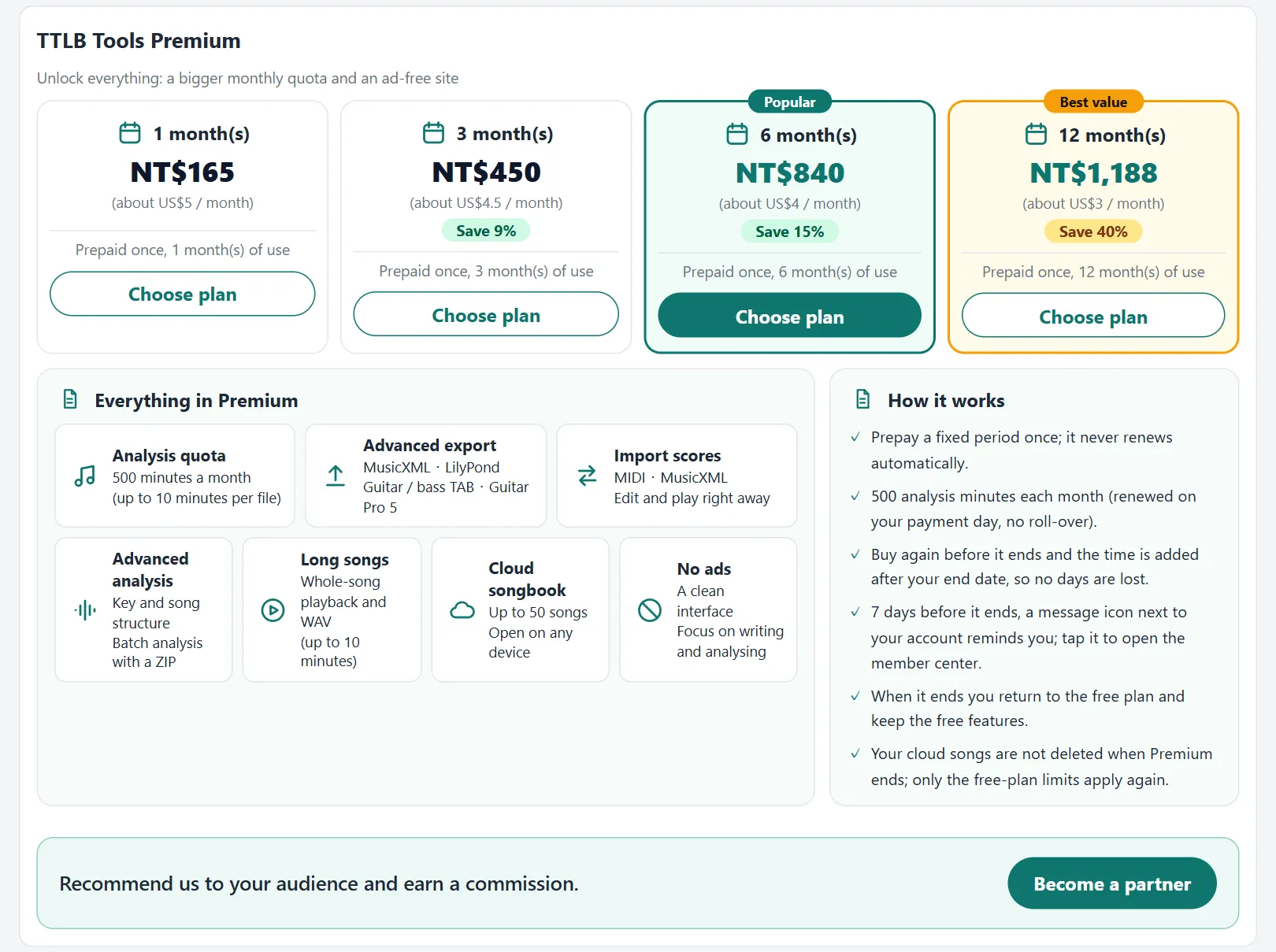
Figure 9: Premium plans and features (prepaid, no automatic renewal).
▶ See Premium plans and features Try the free tools first.
Frequently Asked Questions
Can I write a song if I do not play an instrument?
Yes. You can type the numbers 1–7 or place notes on screen, and listen as you adjust the melody. An instrument widens your options, but it is not required to start.
Do I need to read sheet music?
No. Start with number input; the staff appears automatically and works as a visual reference while you learn.
Can I make music online for free, without signing up?
Yes. The free tools cover melodies, chords, rhythms and lyrics, plus PNG, PDF, WAV (up to 3 minutes), MIDI and JSON export. No account, login or installation is needed. The free version shows ads.
Can I turn humming into sheet music?
Yes. Audio to Score turns a short recording into an editable notation draft. The free version handles up to 30 seconds per attempt. Treat the result as a draft: play it, then correct notes and rhythm.
Is my audio uploaded or stored?
No. Recordings and audio files are processed in your browser and are never uploaded or saved.
Is this AI?
No. Audio to Score uses signal analysis, and the melody and chord generator follows fixed musical rules. Neither uses an AI model.
Do I need a professional DAW?
Not for your first short song. Build and play a basic arrangement in the browser, then export MIDI (or MusicXML with Premium) if you want to continue in other software.
Can I finish a song with the free version?
Yes. A short song with a melody, chords, sections and a simple beat can be created and exported with the free tools.
Does Premium renew automatically?
No. It is prepaid for a fixed period. When the period ends you return to the free version; no cancellation is needed.
Can I use the demo song “Tonight’s Sea”?
It is an original teaching example. Use it to listen, practice and experiment. If you publish a version as your own work, replace the melody and any lyrics with your own.
Your First Song Starts With One Small Idea
You do not need a studio, a collection of instruments or a full understanding of music theory. Write a short melody, give it a chord progression, arrange a few sections and save what you make. And if a tune comes to you today, record it before it disappears.
▶ In 30 minutes, have a song of your own (start free)
▶ Capture the tune before you forget it—hum it into a notation draft
More music tools: Melody, Chords, Rhythm, Lyrics and My Works
Comments (0)
No comments yet.
Comments are published first and reviewed afterwards; rule-breaking comments are hidden. Only signed-in members can comment.